
Wedding gifts without duplicates

Shared wedding gift list: how to organize it with Tasks4Us

Create a shared wedding gift list so every guest can see what is still available, what has already been bought and leave a clear confirmation without flooding the chat.

What usually happens

When the gift list turns into extra work

A wedding gift list often starts simple and then spreads across WhatsApp, calls and private notes. Two guests ask about the same present, someone buys an item that was already reserved, and the couple becomes the coordination hub when they should be focusing on the rest of the wedding.

Simple solution

How Tasks4Us organizes it

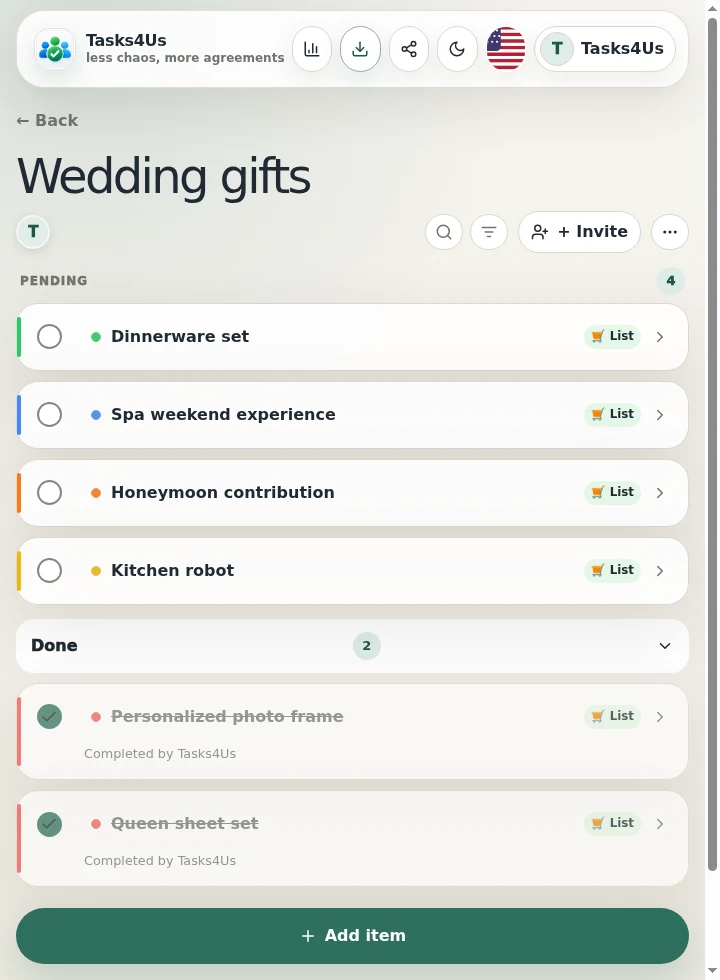
In Tasks4Us every gift is a visible item in the group. The couple can add ideas, references or priorities; guests see what is pending, mark an item as bought and leave a photo or note so nobody repeats the purchase.

Decide without asking

Clear information so each guest knows what they can buy.

Visual categories

Group gifts by intention: home, experience, contribution, urgent or reserved. Guests can quickly find the right option without asking for instructions in the chat.

Photos that confirm

Use photos to show the chosen model, keep a receipt or confirm that the gift has already been bought. A picture turns a promise into a visible confirmation for everyone.
Less friction for everyone

  • Fewer duplicate gifts because each purchase is marked as soon as it happens.
  • Fewer “I will buy this” messages mixed into wedding conversations.
  • Less coordination work for the couple because guests can confirm directly.
  • More confidence for guests because they see which options are still available before buying.
Step by step

From a loose idea to a shared gift list.

  1. Create a “Wedding gifts” group.
  2. Add each gift as an item with a clear note, link or reference photo.
  3. Invite relatives and guests who are participating in the purchase.
  4. Mark the chosen gift as bought so it moves away from the pending list.
  5. Attach a photo or comment when it helps confirm the model, receipt or booking.
Real Tasks4Us example for Shared wedding gift list
Real Tasks4Us screenshot with pending and completed items separated.
Quick answer

What is this group for?

The couple stops coordinating every purchase one by one, and guests choose with confidence because everyone sees the same updated list.

Try it with my group
More ways to use it

Other groups you can organize with Tasks4Us.

Family organization with kids, parents and grandparents

Use Tasks4Us to coordinate children, parents and grandparents with colors per child, common tasks and individual responsibilities so nothing is duplicated or forgotten.

Read example →

Shared flat: cleaning, shopping and common payments

Organize a shared flat with Tasks4Us: cleaning, shopping, common payments and maintenance tasks visible to every flatmate.

Read example →

Sports team: training, matches and equipment

Coordinate a sports team with shared tasks: equipment, schedules, matches, owners, photos and confirmations.

Read example →